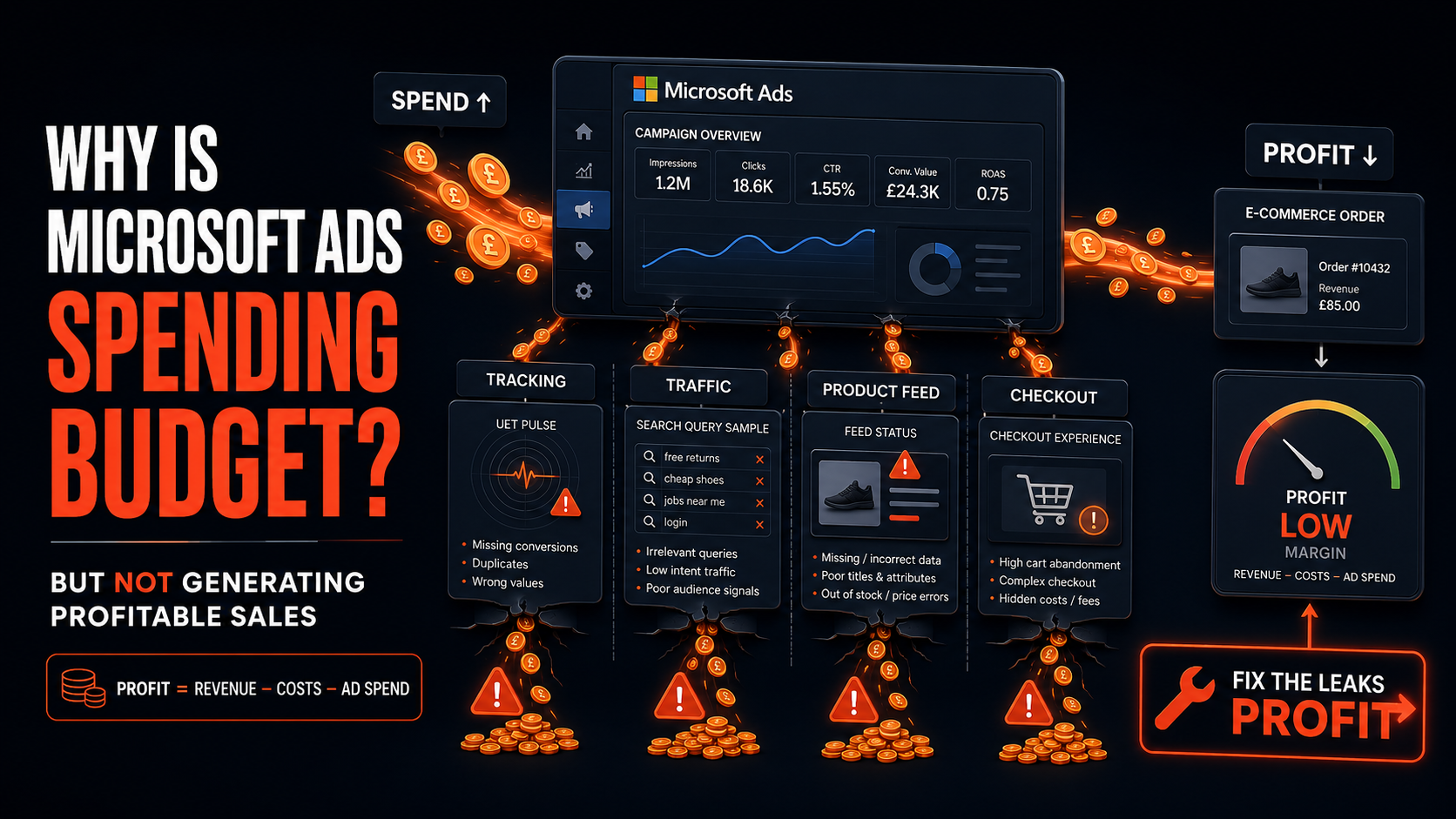
Microsoft Ads can spend budget without producing profitable e-commerce sales when it is buying low-intent traffic, optimising towards weak or inaccurate conversion signals, promoting the wrong products, or sending visitors to an offer and checkout experience that does not convert.
The solution is rarely as simple as lowering bids. First verify that Microsoft is measuring real purchases correctly. Then identify which networks, publishers, queries, products and customer groups are consuming spend. Finally, optimise towards contribution profit rather than platform-reported revenue.
The central diagnostic question is:
Is Microsoft failing to generate sales—or is it generating sales that are being measured incorrectly, attributed too generously or acquired at unprofitable economics?
The short answer
Microsoft Ads normally spends without generating profitable sales for one or more of these reasons:
- Purchase tracking is missing, duplicated or passing incorrect values.
- Automated bidding is optimising towards page views, add-to-baskets or other weak goals.
- Search-partner or audience traffic is absorbing budget without sufficient buying intent.
- Imported Google campaigns have not been adapted for Microsoft.
- Search terms are too broad or commercially irrelevant.
- Brand and returning-customer conversions hide weak prospecting.
- Shopping feeds promote low-margin, unavailable or uncompetitive products.
- Landing pages do not match price, stock, delivery or product promises.
- Bidding targets are based on revenue rather than contribution margin.
- The campaign is changed too frequently for automated bidding to stabilise.
Work through those areas in that order. Changing bids before validating measurement can make a tracking problem appear to be a media improvement.
Check measurement before judging performance
Microsoft’s Universal Event Tracking tag—UET—is the foundation for recording website activity, conversion goals, remarketing audiences and automated bidding signals.
For e-commerce, the purchase event should pass the information needed to identify and value a completed transaction. Microsoft’s UET guidance supports dynamic revenue, currency and transaction ID parameters. The product IDs used for dynamic remarketing should match those in the Microsoft Merchant Center feed.
Audit the purchase goal
Confirm:
- The purchase goal fires only after a completed order.
- Purchase is included in the conversion goals used for bidding.
- Page views, product views and add-to-baskets are not treated as equal to purchases.
- The goal uses the correct counting method for retail transactions.
- The attribution window is documented and consistent when comparing periods.
- Test transactions can be identified and excluded from commercial reporting.
A campaign optimising towards add-to-baskets may produce a large number of “conversions” without generating profitable orders. The bidding system is doing what it was instructed to do; the instruction is commercially weak.
Validate dynamic revenue
Do not pass a fixed value such as £1 or £100 for every purchase unless every transaction genuinely has that value.
Confirm that the purchase event sends:
- Actual order revenue.
- Correct currency.
- Unique transaction ID.
- Relevant product IDs.
- Item quantities and values where required for the implementation.
If Microsoft receives inflated revenue, a campaign can appear to achieve a strong ROAS while losing money. If it receives no revenue or an artificially low value, automated value-based bidding cannot distinguish stronger orders from weaker ones.
Check deduplication
A thank-you-page refresh, returning to the confirmation URL or duplicate tag can record the same order more than once.
Use transaction IDs and test:
- A normal completed purchase.
- A confirmation-page refresh.
- Returning to the confirmation URL later.
- Alternative payment methods.
- Mobile and desktop checkout.
- Express checkout and wallet payments.
The commerce platform may show one £120 order while Microsoft reports two £120 conversions. That turns a genuine 3x ROAS into an apparent 6x ROAS.
Reconcile Microsoft with store data
Create a transaction-level reconciliation between:
- Microsoft Ads.
- Shopify, Magento, WooCommerce or the commerce platform.
- GA4.
- Payment-provider records.
- Refund and cancellation data.
- The finance or business-intelligence system.
Exact totals may differ because attribution windows, consent, cross-device behaviour and reporting dates vary. Large or sudden discrepancies require investigation before changing campaigns.
Use real profitability—not reported ROAS
ROAS is:
ROAS = attributed revenue ÷ ad spend
It excludes the commercial costs of fulfilling the sale.
Calculate contribution profit:
Contribution profit after ads = revenue − cost of goods − fulfilment − payment fees − discounts − expected returns − ad spend
Suppose Microsoft spends £10,000 and reports £40,000 revenue. The account shows a 4x ROAS.
| Item | Amount |
|---|---|
| Revenue | £40,000 |
| Cost of goods | -£20,000 |
| Fulfilment and shipping support | -£4,000 |
| Payment fees | -£1,200 |
| Discounts and returns allowance | -£5,000 |
| Advertising spend | -£10,000 |
| Contribution after ads | -£200 |
The campaign appears successful in-platform but loses money.
Calculate break-even ROAS
Break-even ROAS = 1 ÷ pre-ad contribution margin
If an average £100 order leaves £30 after product costs, fulfilment, payment fees and expected returns, pre-ad contribution margin is 30%:
1 ÷ 0.30 = 3.33x
At 3.33x, advertising consumes the available pre-ad contribution. A 4x result may produce profit; a 3x result may lose money.
Perform the calculation by product group when margins vary. One account-wide target can encourage Microsoft to sell high-revenue, low-margin items while underfunding more profitable products.
Find exactly where Microsoft is spending
Microsoft inventory extends beyond a single set of Bing search results. Search ads can appear on Microsoft properties and eligible partner sites, depending on ad distribution settings. Audience activity can also reach users across Microsoft inventory.
This can increase reach, but it can blend traffic with very different levels of purchase intent.
| Area to inspect | What it may reveal |
| Microsoft sites versus partner traffic | A partner or distribution group may have cheaper clicks but weak conversion quality |
| Search versus audience placements | Research-led or passive audiences may be judged against high-intent Search targets |
| Website URL publisher report | Specific sites or apps may consume cost without producing valuable orders |
| Search terms | Broad matching may expose campaigns to irrelevant or early-stage queries |
| Device | Mobile or desktop may have materially different conversion economics |
| Geography | Spend may occur outside commercially useful fulfilment areas |
| Brand versus non-brand | Brand conversions may hide weak customer acquisition |
| New versus returning customers | Existing buyers may inflate apparent prospecting performance |
| Product and category | Low-margin or high-return products may absorb budget |
Microsoft’s Website URL publisher report can show impressions, clicks, spend and conversions for sites across the Microsoft Advertising Network. Use it to identify publishers that fail the campaign’s commercial thresholds and apply exclusions where appropriate.
Diagnose network and publisher quality
Microsoft’s ad-distribution options can include Microsoft sites, select partner traffic and additional syndicated partners. The appropriate choices depend on market and campaign type, and Microsoft notes that the settings are applied at ad-group level for many campaign types.
Do not assume every partner is poor—or that every Microsoft-owned placement is profitable. Evaluate evidence.
Build a publisher scorecard
For each visible publisher or distribution group, report:
- Impressions.
- Clicks.
- Spend.
- Conversions.
- Revenue.
- CPA.
- ROAS.
- New customers.
- Contribution profit.
Exclude or isolate publishers that spend materially without producing commercially acceptable results. Be cautious with small samples: a publisher with £20 spend and no orders has not necessarily failed, while one with £5,000 spend and persistent losses deserves action.
Separate Search and Audience activity
Search reaches people expressing intent through a query. Audience advertising may reach users based on signals, content and behaviour without an immediate product search.
They should not automatically share:
- The same CPA target.
- The same creative.
- The same landing page.
- The same conversion expectation.
- The same reporting line.
Separating them makes it possible to see whether Microsoft Search is profitable while broader inventory is not—or the reverse.
Audit search terms and intent
A keyword can appear commercially relevant while the actual search terms triggering it are not.
Review the Search Terms report for:
- Informational questions with no clear route to purchase.
- Job, support, manual, free, second-hand or repair intent where irrelevant.
- Searches for incompatible products or models.
- Competitor terms that do not convert profitably.
- Locations the business cannot serve.
- Broad product concepts unrelated to the stocked catalogue.
- High-spend terms producing low-value orders.
Classify search terms by intent:
| Intent | Example | Typical action |
| High commercial | “buy oak dining table delivery UK” | Protect and scale if profitable |
| Product-specific | Exact model, SKU or compatibility query | Direct to the closest product page |
| Category comparison | “best office chair for back support” | Test with category or comparison page |
| Informational | “how are office chairs made” | Exclude or treat as upper-funnel activity |
| Irrelevant | Wrong product, location or use | Add negative keyword |
Do not add negatives blindly. Some research queries contribute to assisted sales, but they should be measured as a deliberate funnel investment rather than hidden inside a direct-response campaign.
Imported Google campaigns need Microsoft-specific decisions
Google Import can transfer eligible campaign structures, keywords, ads, targeting, bids and budgets into Microsoft Advertising. It saves setup time but does not guarantee that the imported strategy suits Microsoft’s auctions and inventory.
After import, review:
- Campaign and ad-group budgets.
- Bidding strategy and target.
- Match types.
- Negative keywords.
- Ad distribution.
- Geographic and language settings.
- Device performance.
- Audience associations.
- Final URLs and tracking templates.
- Conversion goals included in bidding.
- Product feeds and catalogue connections.
Avoid scheduling automatic imports without understanding what they will overwrite or change. A profitable Microsoft campaign can be disrupted if a later Google import applies unsuitable budgets, targets or exclusions.
Fix Microsoft Shopping and feed problems
For Shopping campaigns, the feed determines which products are eligible, what information Microsoft understands and how relevant the ad appears.
Review feed health
Check:
- Store and catalogue approval.
- Rejected, pending or limited products.
- Feed freshness and scheduled updates.
- Product IDs and variant handling.
- Price and sale-price accuracy.
- Availability.
- Shipping and delivery information.
- GTIN, MPN and brand completeness.
- Product type and category.
- Colour, size, material and other relevant attributes.
- Image quality and policy compliance.
Microsoft notes that Merchant Center feeds expire if they are not updated within the required period and recommends frequent updates to keep product information fresh. A stale feed can promote unavailable products or stop products from serving.
Match product IDs across systems
The product identifier used on the website and in UET events should match the corresponding Microsoft Merchant Center feed ID where required for dynamic remarketing and product-level reporting.
Mismatches can weaken:
- Dynamic remarketing.
- Product attribution.
- Audience creation.
- Item-level optimisation.
- Feed-to-conversion analysis.
Segment products commercially
Do not fund every SKU equally.
Use labels or campaign structure to distinguish:
- High-margin products.
- Bestsellers.
- High-stock items.
- Seasonal products.
- Clearance items.
- Low-margin products.
- High-return products.
- Strategic new ranges.
Then apply budgets and targets based on their economics.
Assess competitiveness
A technically correct feed can still underperform when:
- Price is uncompetitive.
- Delivery is slower or more expensive.
- Reviews are weaker.
- Images are poor.
- Promotions have ended.
- Key variants are unavailable.
- The product title omits high-intent attributes.
The media account cannot compensate indefinitely for an offer shoppers do not choose.
Check the landing page and checkout
If traffic quality is acceptable but conversion rate is weak, the problem may be on-site.
Review by landing page, device and product category:
- Page-load performance.
- Product price and availability.
- Variant selection.
- Delivery costs and dates.
- Returns information.
- Trust signals and reviews.
- Product specifications.
- Mobile usability.
- Payment options.
- Voucher-code behaviour.
- Checkout errors.
The ad, feed and landing page must present a consistent promise. If the ad shows a sale price that is unavailable on the page, or the feed implies stock that cannot be purchased, conversion and trust will deteriorate.
Use the conversion equation
Revenue = clicks × conversion rate × average order value
If spend rises but revenue does not, determine which component changed:
- CPC increased, reducing clicks.
- Traffic volume rose but conversion rate fell.
- Orders remained stable but AOV declined.
- Returns increased after the reported sale.
This prevents every problem being incorrectly labelled a bidding issue.
Audit location and device settings
Check where users are physically located and whether the business can serve them profitably.
Common problems include:
- Targeting people interested in a location rather than present within it.
- Spending in regions with high shipping cost.
- Advertising products unavailable in a market.
- Mixing currencies.
- Weak mobile checkout performance hidden by desktop sales.
- Applying imported Google bid adjustments without validating Microsoft data.
Report CPA, ROAS and contribution by device and geography. Do not optimise from CPC alone.
Separate brand, non-brand and customer status
Brand Search often reports excellent ROAS because customers already know the retailer. Remarketing and returning-customer campaigns can show the same effect.
Separate:
- Brand Search.
- Non-brand Search.
- Shopping prospecting.
- Remarketing.
- New customers.
- Returning customers.
If brand and existing customers produce 8x ROAS while non-brand acquisition produces 1.5x, the account-wide 4x average can conceal a serious growth problem.
The platform may be generating sales—but not enough new, incremental or profitable sales to justify the spend.
Give automated bidding accurate data and time
Microsoft’s current bid-strategy guidance says that newly configured Target CPA and Target ROAS controls are used through Maximise Conversions and Maximise Conversion Value respectively. Target ROAS requires conversion tracking and positive revenue values.
Microsoft recommends allowing automated bidding enough time to accumulate at least 30 conversions before evaluating performance. Its guidance also describes a learning period that can take approximately one to two weeks and advises against repeatedly changing budgets, conversion settings, ad groups or keywords during that phase.
That does not mean an advertiser should tolerate uncontrolled losses. Use sensible budget limits and correct obvious errors immediately. But do not make daily target changes and then conclude that automation cannot learn.
Avoid weak bidding signals
Automated bidding will struggle when:
- Purchases are mixed with low-value actions.
- Revenue is fixed, missing or duplicated.
- Conversion volume is very low.
- Refunds are ignored.
- Product margins vary dramatically.
- The target changes frequently.
- The campaign is repeatedly restructured.
Where volume is insufficient, consider consolidating closely related campaigns or using a more appropriate bidding approach until reliable purchase data develops.
A practical recovery plan
Phase 1: measurement
- Reconcile Microsoft orders and revenue with the commerce platform.
- Test UET across the customer journey.
- Confirm purchase values, currency and transaction IDs.
- Remove weak conversion goals from bidding where inappropriate.
- Establish refunds, cancellations and contribution margin.
Phase 2: spend isolation
- Report Search, partner and Audience activity separately.
- Run the Website URL publisher report.
- Segment brand, non-brand, new and returning customers.
- Break performance down by query, device, location and product.
- Identify where the first 80% of unprofitable spend occurs.
Phase 3: traffic and feed control
- Exclude clearly wasteful publishers and queries.
- Review ad-distribution settings.
- Correct Merchant Center errors and stale data.
- Segment high-margin and low-margin products.
- Relaunch around high-intent searches and in-stock bestsellers.
Phase 4: conversion and bidding
- Fix landing-page and checkout issues.
- Select a bidding strategy supported by the available conversion data.
- Use contribution-based targets.
- Allow a stable learning and evaluation period.
- Scale only when marginal spend creates incremental contribution profit.
A 30-day diagnostic timetable
| Period | Priority | Output |
| Days 1–3 | Tracking and reconciliation | Confirm whether the reported problem is real |
| Days 4–7 | Network, publisher and query analysis | Identify where spend leaks |
| Days 8–12 | Shopping feed and product economics | Isolate profitable catalogue areas |
| Days 13–17 | Landing-page and checkout QA | Remove on-site conversion barriers |
| Days 18–21 | Restructure and exclusions | Protect high-intent demand |
| Days 22–30 | Controlled relaunch | Establish a clean baseline for evaluation |
Do not assess the recovery only from the first few days after restructuring. Conversion lag and automated bidding require an appropriate observation period.
The scorecard management should receive
| Metric | Why it matters |
| Spend | Total investment and source of leakage |
| Orders and revenue | Transaction outcome |
| CPC and conversion rate | Separates media cost from traffic or site quality |
| CPA and ROAS | Platform efficiency diagnostics |
| Contribution profit | Actual first-order commercial outcome |
| New-customer CPA | Measures acquisition rather than retention |
| Return and cancellation rate | Adjusts reported success for order quality |
| Brand/non-brand split | Prevents existing demand hiding weak growth |
| Publisher and network performance | Exposes placement quality |
| Product-group profit | Identifies which catalogue areas deserve budget |
| Blended MER | Tests whether platform growth appears in total business performance |
| Marginal contribution profit | Determines whether the next pound should be spent |
Common mistakes that make recovery harder
Cutting every bid
Lower bids can reduce traffic without fixing poor measurement, weak queries or an uncompetitive offer.
Pausing the entire account immediately
This removes profitable demand alongside waste and makes it harder to isolate the cause.
Trusting the account-wide ROAS
The average may blend brand, returning customers and profitable products with unprofitable prospecting.
Importing Google repeatedly without review
Scheduled imports can reintroduce settings or structures that do not suit Microsoft.
Optimising from too little data
One or two conversions do not prove a product, publisher or campaign works.
Changing automated bidding every few days
Frequent disruption prevents a stable evaluation and may restart learning.
Ignoring the website
Paid media cannot overcome missing stock, poor delivery terms or a broken checkout.
The practical conclusion
So, why is Microsoft Ads spending budget but not generating profitable e-commerce sales?
The most likely causes are unreliable measurement, low-intent traffic, uncontrolled network distribution, weak search terms, poor Shopping data, unsuitable product economics or an on-site conversion problem.
Start with UET and transaction reconciliation. Then expose where the spend goes through network, publisher, query, device, location and product reporting. Restructure around high-margin products and commercial intent, and judge performance through contribution profit and new-customer acquisition.
The issue is rarely that Microsoft Advertising categorically “does not work.” More often, the account began spending before its measurement, traffic controls, feed and commercial targets were ready.
Frequently asked questions
Why does Microsoft Ads spend its full budget without conversions?
The campaign may be optimising towards the wrong goal, entering weak searches or placements, promoting unsuitable products or suffering from conversion-tracking failure. Audit UET and traffic sources first.
How do I check where Microsoft Ads appeared?
Use network and campaign reporting, including the Website URL publisher report where applicable, to review impressions, clicks, spend and conversions by website or distribution source.
Should I turn off Microsoft Audience Network traffic?
Not automatically. Separate and evaluate it against its commercial purpose. Restrict or exclude activity that cannot meet the agreed acquisition or contribution target.
How many conversions does Microsoft automated bidding need?
Microsoft recommends allowing enough time to accumulate at least 30 conversions before evaluating several automated strategies. Data quality matters as much as quantity.
Why is Microsoft Shopping generating clicks but no sales?
Likely causes include weak product matching, inaccurate feed attributes, uncompetitive pricing, unavailable variants, poor landing pages or low-intent traffic. Review product-level performance and feed diagnostics.
Is a 4x Microsoft Ads ROAS profitable?
Only if the retailer’s contribution margin supports it. A 4x ROAS can still lose money when product costs, fulfilment, fees, discounts and returns are high.
Should we lower bids when Microsoft Ads is unprofitable?
Lowering bids may help when CPC is the problem, but it will not fix incorrect tracking, weak intent, poor product selection or a broken checkout. Diagnose the revenue equation first.
Is your Microsoft Ads account spending without creating profit?
Clubbish helps e-commerce businesses audit Microsoft tracking, traffic quality, Shopping feeds, bidding and product-level profitability.
If spend is rising but commercially valuable sales are not, book a marketing strategy consultation with Clubbish.